How to Choose Affordable Conjoint Analysis Software
Find affordable conjoint analysis software with randomized profiles, built-in results, editable graphs, and analysis-ready exports.
The Short Version
Find affordable conjoint analysis software with randomized profiles, built-in results, editable graphs, and analysis-ready exports. A practical way to begin is to write down the features your study actually requires, then confirm that the software randomizes attributes and records every profile shown. Finish by making sure you run the study in the free research engine before paying for the production workflow. The full walkthrough below explains each part in order.
Is This Guide for You?
Researchers, students, startups, consultants, and small teams that need serious conjoint features without an enterprise software budget.
Follow These Steps
Work through these 6 steps at your own pace. The wording is intentionally practical, and you can return to the checklist at the end when you are ready to review your work.
- Write down the features your study actually requires.
- Confirm that the software randomizes attributes and records every profile shown.
- Check for restrictions, design review, respondent links, and mobile preview.
- Verify that free results include effects, confidence intervals, quantitative text analysis, and standard graphs.
- Confirm that paid exports include clean data, a codebook, analysis scripts, and publication-ready figure tools.
- Run the study in the free research engine before paying for the production workflow.
What This Helps You Accomplish
Affordable conjoint analysis software should reduce cost without removing the profile records, exports, and documentation needed to understand or defend the study.
What a Good Result Looks Like
Affordable software should preserve the essentials of a defensible conjoint workflow: randomized profiles, stored exposures, restrictions, previewing, understandable estimates, and usable exports. Price is only good value when the resulting study can be inspected and analyzed.
Example: compare total workflow cost
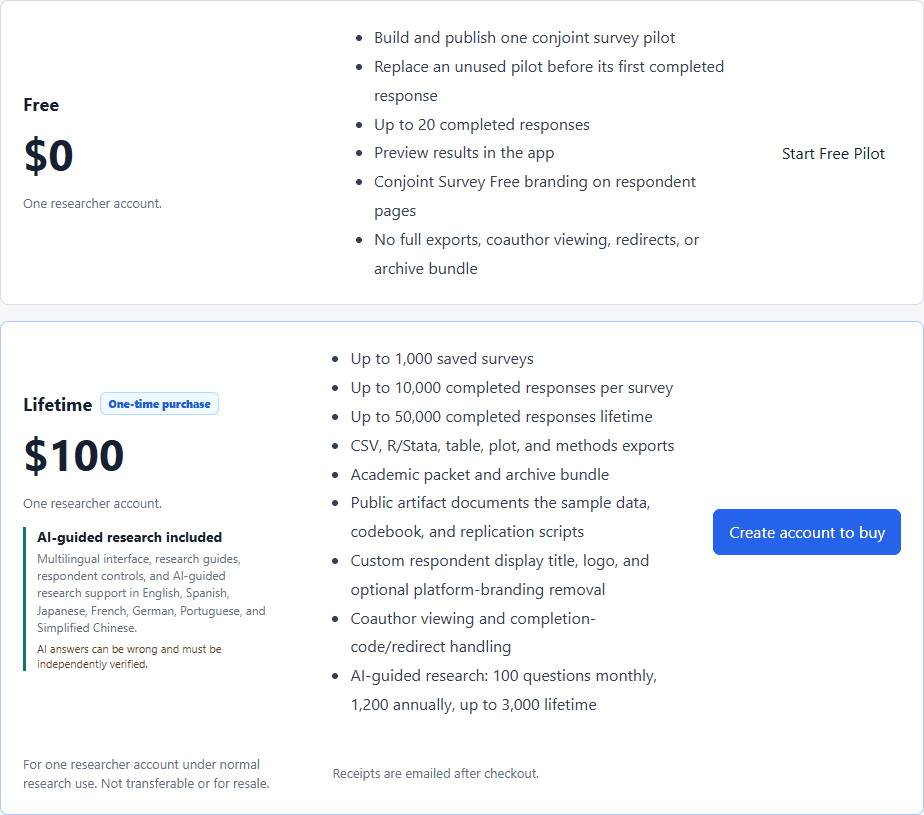
A free form builder may look cheaper until the researcher must write custom randomization, reshape data, calculate clustered estimates, and rebuild figures elsewhere. Compare the full path from design to reporting, including subscriptions, modules, analyst time, response limits, and export restrictions.
Decisions to Make Before You Begin
- Separate required research capabilities from optional collaboration features.
- Check what remains usable before payment.
- Confirm the response and export limits in writing.
- Test the actual builder and result output rather than relying on a feature list.
Common Mistakes to Avoid
- Comparing only the advertised monthly price.
- Assuming every survey platform includes conjoint analysis.
- Paying before previewing the respondent experience and output structure.
Your Practical Next Step
Build and field the real study with the Free research engine. Upgrade only when the project needs production exports, publication figures, panel workflows, coauthors, AI Help, or larger fielding.
A Quick Confidence Check
- Transparent price.
- Substantial Free plan.
- Randomized profiles.
- Stored task data.
- Built-in analysis and graphs.
- Clear paid export boundary.
Common Questions
Can I use this guide if I am new to this?
Yes. Researchers, students, startups, consultants, and small teams that need serious conjoint features without an enterprise software budget. Follow the steps in order, start with a small test, and use the final checklist before you field or report anything important.
What is the simplest way to get started?
Begin by write down the features your study actually requires. Next, confirm that the software randomizes attributes and records every profile shown. You do not need to perfect every setting before running a small preview or pilot.
How do I know when I am ready?
Use the confidence check above. In particular: Transparent price. Substantial Free plan. Randomized profiles. Stored task data. When the decision is consequential, keep your study documentation and ask a qualified colleague or methods reviewer to examine the design as well.
Related Guides
Research artifact: sample data, codebook, and scriptsResearch Pathways
Product names and fielding platforms mentioned in this guide belong to their respective owners. Conjoint Survey is an independent academic research tool and is not affiliated with, sponsored by, or endorsed by those services.