How to Use Free Conjoint Analysis Software for a Pilot Study
Build, publish, field, and analyze a conjoint study free before paying for production exports and collaboration tools.
The Short Version
Build, publish, field, and analyze a conjoint study free before paying for production exports and collaboration tools. A practical way to begin is to create a free account and build a conjoint survey, then enter the attributes, levels, restrictions, questions, and respondent instructions. Finish by making sure you upgrade only when you need exports, publication figure tools, panel workflows, coauthors, AI Help, or larger fielding. The full walkthrough below explains each part in order.
Is This Guide for You?
Researchers who want to confirm that a conjoint design works before committing software or respondent money.
Follow These Steps
Work through these 6 steps at your own pace. The wording is intentionally practical, and you can return to the checklist at the end when you are ready to review your work.
- Create a free account and build a conjoint survey.
- Enter the attributes, levels, restrictions, questions, and respondent instructions.
- Preview the complete survey on desktop and mobile.
- Publish the study and collect responses within the 2,000-response account allowance.
- Inspect the full in-app analysis and standard graphs.
- Upgrade only when you need exports, publication figure tools, panel workflows, coauthors, AI Help, or larger fielding.
What This Helps You Accomplish
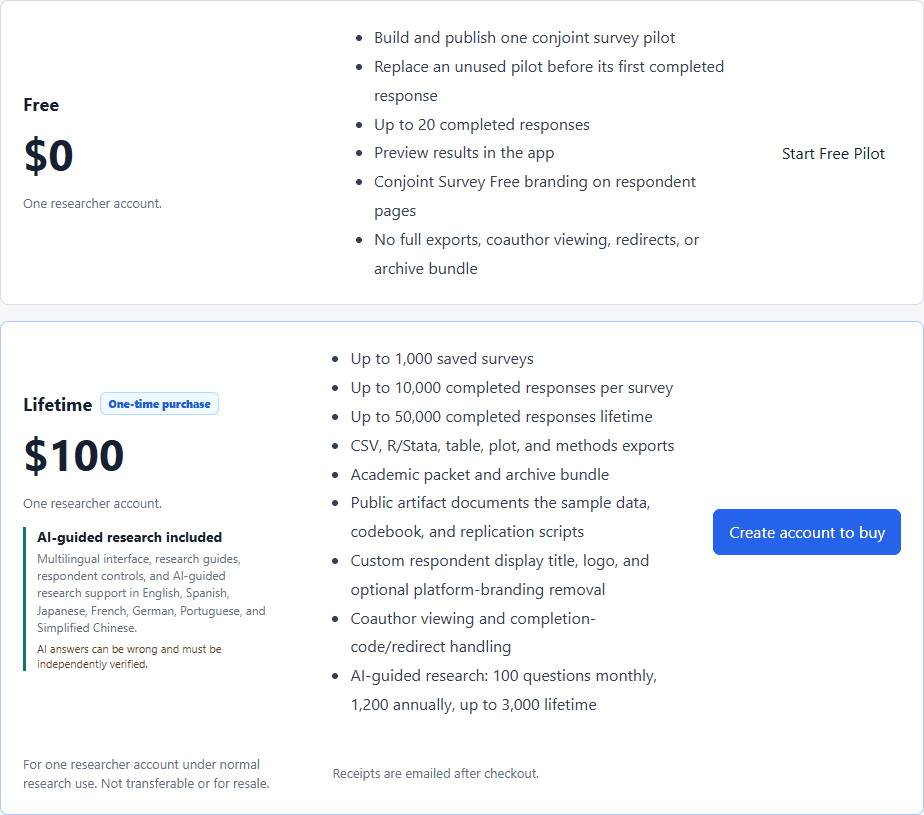
A useful free conjoint tool should run real research rather than display a restricted demo. Conjoint Survey's Free plan includes multiple studies, up to 2,000 accepted responses across the account, quantitative text analysis, in-app statistics, and standard graphs before purchase.
What a Good Result Looks Like
A valuable Free research tier lets the researcher build the real instrument, publish it, field an appropriately sized study, and inspect the intended analysis. It should state the account-level allowance and Paid production boundaries before recruitment begins.
Example: allocate 2,000 responses deliberately
A researcher might reserve 50 responses for live-link and quality checks, then allocate the remaining allowance to one larger study or two planned experiments. Monitor accepted responses across the account and decide before fielding whether Paid exports or panel workflows will be required.
Decisions to Make Before You Begin
- Define pilot success criteria before collecting responses.
- Decide which testers resemble the target population.
- Record every wording and design revision.
- Keep pilot and main-study data separate when the instrument changes.
Common Mistakes to Avoid
- Recruiting before testing the live link.
- Forgetting that the response allowance is shared across studies.
- Waiting until a deadline to discover that production exports require Paid.
Your Practical Next Step
Build the complete instrument first, then spend the free responses on deliberate tests of the decisions most likely to fail during real fielding.
A Quick Confidence Check
- Test the actual respondent link.
- Use realistic attributes.
- Check mobile layout.
- Inspect profile randomization.
- Plan sample size before fielding.
- Export or collaboration needs require Paid.
Common Questions
Can I use this guide if I am new to this?
Yes. Researchers who want to confirm that a conjoint design works before committing software or respondent money. Follow the steps in order, start with a small test, and use the final checklist before you field or report anything important.
What is the simplest way to get started?
Begin by create a free account and build a conjoint survey. Next, enter the attributes, levels, restrictions, questions, and respondent instructions. You do not need to perfect every setting before running a small preview or pilot.
How do I know when I am ready?
Use the confidence check above. In particular: Test the actual respondent link. Use realistic attributes. Check mobile layout. Inspect profile randomization. When the decision is consequential, keep your study documentation and ask a qualified colleague or methods reviewer to examine the design as well.
Related Guides
Research artifact: sample data, codebook, and scriptsResearch Pathways
Product names and fielding platforms mentioned in this guide belong to their respective owners. Conjoint Survey is an independent academic research tool and is not affiliated with, sponsored by, or endorsed by those services.