How to Build a Conjoint Survey
Create randomized profile pairs with attributes, levels, restrictions, and a respondent link.
The Short Version
Create randomized profile pairs with attributes, levels, restrictions, and a respondent link. A practical way to begin is to start a new survey, then edit the default informed-consent block. Finish by making sure you publish and copy the respondent URL. The full walkthrough below explains each part in order.
Is This Guide for You?
Researchers estimating how attributes affect choices between profiles.
Follow These Steps
Work through these 9 steps at your own pace. The wording is intentionally practical, and you can return to the checklist at the end when you are ready to review your work.
- Start a new survey.
- Edit the default informed-consent block.
- Click Start Conjoint Design.
- Name the study and write the respondent instructions.
- Add attributes and levels.
- Choose the reference level for each attribute.
- Set the number of tasks and profiles per task.
- Preview the respondent flow from the dashboard.
- Publish and copy the respondent URL.
What This Helps You Accomplish
A conjoint study needs clean randomization and a clear profile display. Conjoint Survey records the exact profiles shown to every respondent so exports can be checked and replicated.
What a Good Result Looks Like
A good conjoint survey presents realistic alternatives, changes only features that could genuinely vary, and records every profile each respondent saw. The result is not merely a questionnaire. It is a randomized choice experiment whose estimates can be connected back to a clear research or product decision.
Example: choosing a software package
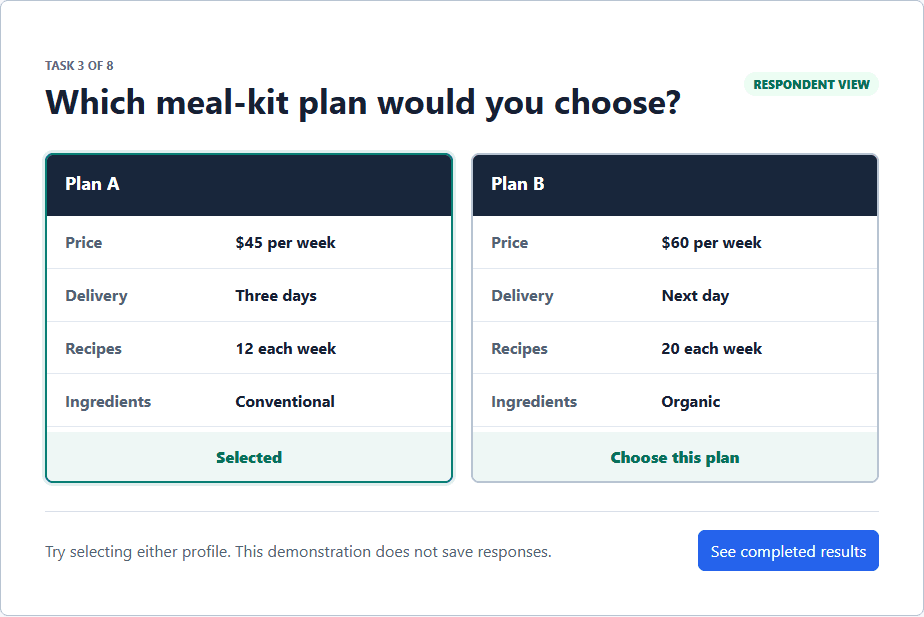
Suppose you want to learn how researchers trade off price, support, and billing terms. Use Price ($25, $50, $75), Support (email, live chat, phone), and Contract (monthly, annual) as attributes. Show two randomly assembled packages in each task and ask which one the respondent would choose. Eight tasks provide repeated choices without asking one person to evaluate every possible combination.
Decisions to Make Before You Begin
- Name the real decision the study will inform.
- Choose attributes that can vary independently and levels that respondents can understand.
- Set a manageable number of tasks and profiles per task.
- Decide whether a neither option reflects the real choice environment.
Common Mistakes to Avoid
- Adding every interesting feature until profiles become exhausting to read.
- Using levels that are vague, overlapping, or impossible in combination.
- Treating the largest estimate as a guaranteed forecast rather than an average experimental effect.
Your Practical Next Step
Draft three to five attributes, then open the pricing conjoint starter and replace its example wording with your own. Preview the complete respondent path before adding complexity.
A Quick Confidence Check
- Avoid too many attributes in one task.
- Use clear level wording.
- Preview mobile layout.
- Export the design summary for preregistration or IRB.
Common Questions
Can I use this guide if I am new to this?
Yes. Researchers estimating how attributes affect choices between profiles. Follow the steps in order, start with a small test, and use the final checklist before you field or report anything important.
What is the simplest way to get started?
Begin by start a new survey. Next, edit the default informed-consent block. You do not need to perfect every setting before running a small preview or pilot.
How do I know when I am ready?
Use the confidence check above. In particular: Avoid too many attributes in one task. Use clear level wording. Preview mobile layout. Export the design summary for preregistration or IRB. When the decision is consequential, keep your study documentation and ask a qualified colleague or methods reviewer to examine the design as well.
Related Guides
Research artifact: sample data, codebook, and scriptsResearch Pathways
Product names and fielding platforms mentioned in this guide belong to their respective owners. Conjoint Survey is an independent academic research tool and is not affiliated with, sponsored by, or endorsed by those services.