How Many Conjoint Tasks to Use
Choose a task count that balances statistical power and respondent fatigue.
The Short Version
Choose a task count that balances statistical power and respondent fatigue. A practical way to begin is to count the number of attributes shown per task, then start with 6 to 10 tasks for many online studies. Finish by making sure you pilot completion time and attention. The full walkthrough below explains each part in order.
Is This Guide for You?
Researchers planning sample size and respondent burden.
Follow These Steps
Work through these 5 steps at your own pace. The wording is intentionally practical, and you can return to the checklist at the end when you are ready to review your work.
- Count the number of attributes shown per task.
- Start with 6 to 10 tasks for many online studies.
- Use fewer tasks for long or complex profiles.
- Use sample planning diagnostics.
- Pilot completion time and attention.
What This Helps You Accomplish
More tasks create more profile observations, but too many tasks can reduce attention and data quality.
What a Good Result Looks Like
The task count should provide repeated randomized choices while keeping the survey short enough for attentive completion. There is no universally correct number. The defensible choice depends on profile complexity, respondent burden, sample size, and the precision required for the planned comparisons.
Example: begin with eight tasks
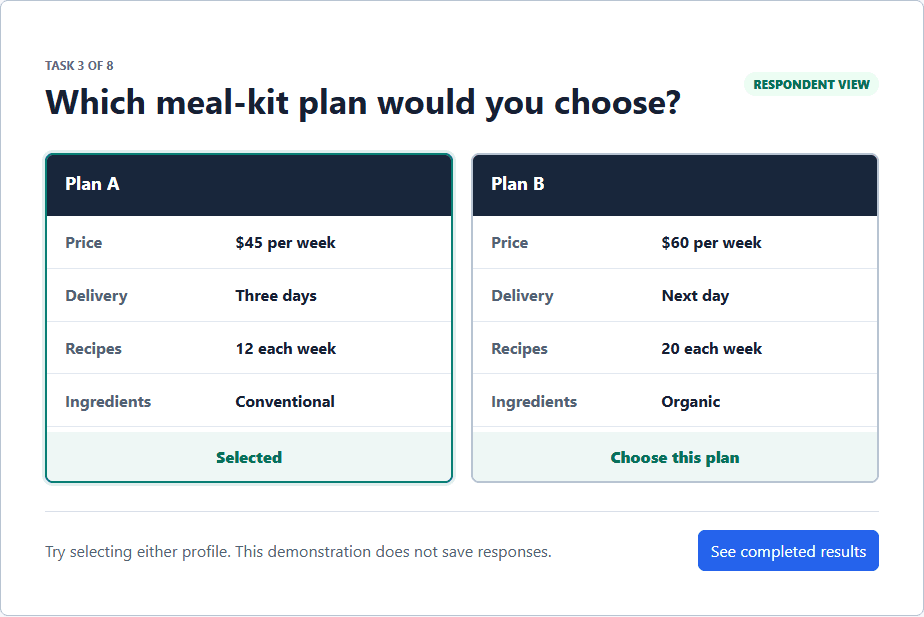
A three-attribute software study with two short profiles can reasonably begin with eight tasks in a pilot. A healthcare study with six dense attributes may need fewer tasks, clearer formatting, or multiple design versions. Pilot completion time and response consistency are more useful than copying a task count from an unrelated study.
Decisions to Make Before You Begin
- Count the words and visual rows in each profile.
- Consider whether the audience regularly makes this kind of decision.
- Balance more observations per respondent against fatigue and satisficing.
- Plan a pilot that measures completion time and identifies where respondents disengage.
Common Mistakes to Avoid
- Assuming more tasks always produce better data.
- Using a published task count without comparing profile complexity.
- Testing burden only on a large desktop screen rather than a phone.
Your Practical Next Step
Start with six to eight tasks for a simple design, preview on mobile, and revise after a small pilot rather than treating that range as a rule.
A Quick Confidence Check
- Avoid exhausting respondents.
- Pilot mobile respondents.
- Document task count in preregistration.
Common Questions
Can I use this guide if I am new to this?
Yes. Researchers planning sample size and respondent burden. Follow the steps in order, start with a small test, and use the final checklist before you field or report anything important.
What is the simplest way to get started?
Begin by count the number of attributes shown per task. Next, start with 6 to 10 tasks for many online studies. You do not need to perfect every setting before running a small preview or pilot.
How do I know when I am ready?
Use the confidence check above. In particular: Avoid exhausting respondents. Pilot mobile respondents. Document task count in preregistration. When the decision is consequential, keep your study documentation and ask a qualified colleague or methods reviewer to examine the design as well.
Related Guides
Research artifact: sample data, codebook, and scriptsResearch Pathways
Product names and fielding platforms mentioned in this guide belong to their respective owners. Conjoint Survey is an independent academic research tool and is not affiliated with, sponsored by, or endorsed by those services.